Which tool should you use to create your media kit in 2026?
Kits connected to your accounts or templates you fill in by hand: 9 media kit tools compared by situation (beginner, TikTok, Twitch, Facebook, agency), with the prices each company lists.
In this article 6 sections
A brand replies: “Can you send me your media kit?” You have two options. Open a template and copy your numbers by hand, or use a tool that reads them directly from your accounts. This guide compares 9 tools to help you pick the one that fits your situation.
How we compared
First, a disclosure: Reachy is our tool, and it’s in this comparison. We describe it by what it does today, limits included.
For the other tools, we read each company’s official pages (product, pricing, help center) on October 29, 2026. Prices change often: the ones listed here are those shown that day, in the company’s currency. When an official page wasn’t readable, we didn’t write the price. Links are at the end of the article.
No numbered ranking: the best tool depends on your networks and what brands ask you for. So the recommendations are sorted by situation.
Two kinds of tools
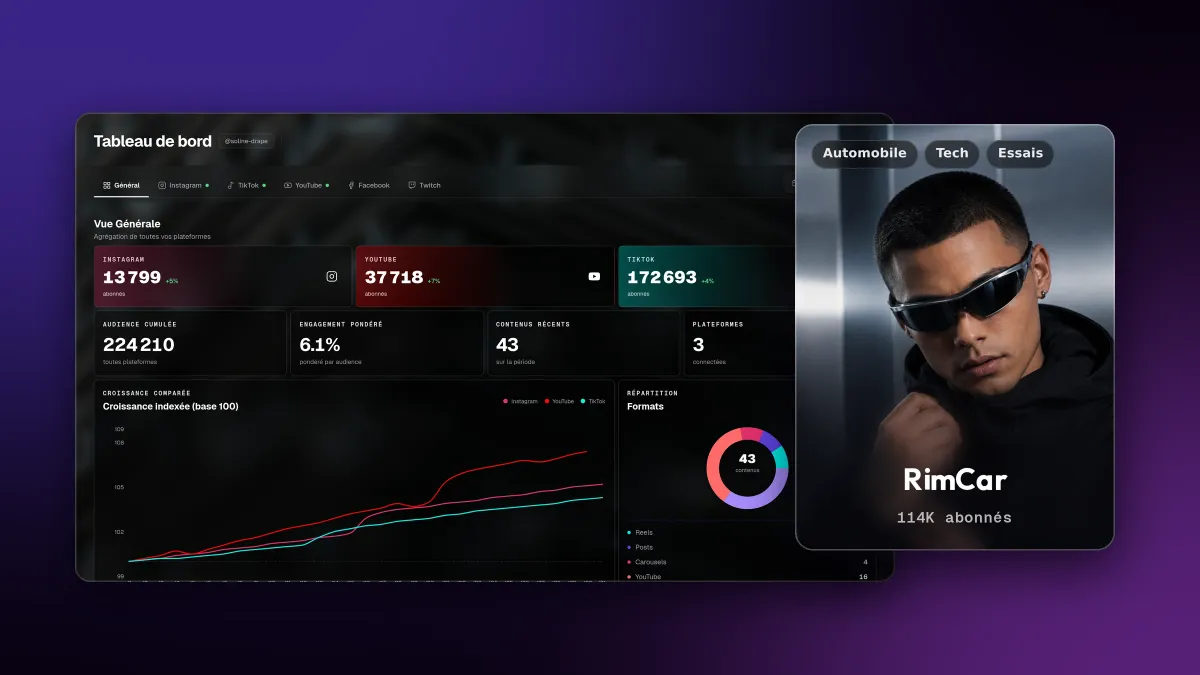
Tools connected to your accounts. You connect your networks, the tool reads your stats and builds a page to share. The numbers update without you copying them. That’s the case for Reachy, CreatorsJet, Beacons, Kitly, HypeAuditor and Passionfroot.
Templates to fill in. You choose a layout and enter your numbers yourself. The design is free-form and often beautiful, but the document is frozen at the date you made it. That’s the case for Canva, Visme and the template offered by Metricool.
The comparison table
| Tool | Numbers | Connected networks | Format | Free plan | Listed paid plan | In French |
|---|---|---|---|---|---|---|
| Reachy | Connected to your accounts | Instagram, TikTok, YouTube, Facebook, Twitch | Web page | All features, during the beta | None during the beta | Yes, and English |
| CreatorsJet | Connected to your accounts | Instagram, TikTok, YouTube, Facebook, Twitch, X, Snapchat, Threads, LinkedIn | Web page, PDF on paid plans | 1 kit, 1 account | Starter $120/year | French website |
| Beacons | Connected to your accounts | Instagram, TikTok, YouTube, Twitch | Web page | Kit included | Creator $10/month | Not stated |
| Kitly | Connected to your accounts | Instagram, Facebook, TikTok, YouTube | Web page | 1 account | $89/year | No (English) |
| HypeAuditor | Connected to your accounts | Instagram, TikTok, YouTube (3 max) | Link | Announced as free at launch | Not stated | No (English) |
| Passionfroot | Live stats | Not listed | Booking page | Yes, fees on deals | No | No (English) |
| Canva | By hand | None | Downloadable template | Free and Pro templates | Not checked | Yes |
| Visme | By hand | None | PDF, image, link | Yes, with Visme logo | Starter $147/year per person | Yes |
| Metricool | Template by hand, separate reports | For its reports | PDF or PPT reports | Free template | Not checked | Yes |
What the table doesn’t show: how often the numbers update. At CreatorsJet, it’s daily on paid plans only. At Beacons, since October 27, 2026, the kit shows a rolling 30-day period. At Reachy, the kit re-reads Instagram, TikTok and YouTube from the platforms when it’s opened (the page rebuilds at most once an hour). Facebook, Twitch and your dashboard history follow a schedule that depends on the plan.
Which tool for your situation
You’re starting out with fewer than 10,000 followers
You don’t need a paid tool. What matters at this stage is a clean kit and real numbers.
- Reachy: free during the beta, with no follower minimum. You can even create your kit before connecting a network and add your numbers later.
- Beacons or Kitly: their free plan includes a kit connected to one account. Handy if you only have one main network.
- Canva: if you’d rather control everything by hand and you send few kits.
To know what to put in it, read our guide to creating your first media kit.
You mostly post on TikTok and Instagram
This is the best-covered case: every tool connected to your accounts reads these two networks. Focus on three things.
- The Instagram account type required. Instagram’s official connections go through a professional account (creator or business). Switch yours before you start, it’s free and reversible.
- Your audience demographics. Age, gender and country are what brands look at first. Check what the tool shows for each of your networks. At Reachy: age, gender and country for Instagram and YouTube, countries and cities for Facebook, no demographics for TikTok yet.
- The time period of the numbers. An average over 30 days or over your latest videos doesn’t tell the same story. Know what the tool shows before you send it.
You stream on Twitch
Few tools read Twitch. In this comparison, Reachy, CreatorsJet and Beacons say they do (Beacons announced it in 2024, and we found no more recent detail).
On Twitch, a brand wants to see your streams more than your followers. Reachy records your streams itself, through Twitch’s official API, while you’re live. Your kit shows your last 30 streams: average and peak viewers, chat, consistency, and your most viewed clips. Paid subscribers (subs) aren’t included.
You post on a Facebook Page
Reachy, CreatorsJet and Kitly connect Facebook. One limit applies to all of them: Meta no longer provides the age or gender of a Page’s audience. Reachy shows the countries and cities your followers come from, which Meta still shares.
A brand asks you for a PDF
Pick a tool that exports one: Visme (PDF on the free plan) or CreatorsJet (PDF on paid plans). Reachy doesn’t export PDFs today, your kit is a web page. If the brand accepts a link, it will get more recent numbers than from an attached file.
You manage several creators, or you work with an agency
In this comparison, Reachy is built for agencies. It’s free during the beta, agencies included. The agency invites its creators with a link, edits their kits, publishes an agency kit that showcases its whole roster, and tracks its campaigns with a report to share with the brand.
On the creator side, your kit stays yours: the agency can edit it as long as you’re on its roster, and you can leave the agency from your settings.
The other tools, in brief
CreatorsJet connects the most networks in this comparison, including X, Snapchat, Threads and LinkedIn. The free plan is limited to one kit and one account, and both daily updates and PDF export require a paid plan.
Passionfroot goes beyond the media kit: it’s a marketplace where brands book your formats directly. Free for creators, with fees taken on deals. Useful if you want to sell your formats online, less so if you just want a kit.
HypeAuditor is mainly an audit tool brands use. Its media kit generator for creators launched for free in 2022. The current page no longer says it’s free: check before you sign up.
Visme and Canva give you the most layout freedom. The price is time: every number has to be copied, then copied again the next month.
Metricool is a scheduling and analytics tool. It offers a free media kit template to download and exportable reports on its paid plans, but no media kit generator as such.
FAQ
How many followers do you need to have a media kit?
There's no minimum. A brand looking for micro-creators mostly looks at your engagement, your niche and the quality of your audience. A clear kit at 3,000 followers beats a screenshot sent by DM. Start as soon as you want to pitch brands, or as soon as a brand asks for one.
PDF or web page: which format should your media kit be?
A web page is shared with one link and can update itself. A PDF gets attached to an email and stays frozen at the date you made it. Some brands and agencies still ask for a PDF: if that's your case, keep one on hand and redo it for each campaign.
Can you create a media kit for free?
Yes. Canva and Visme offer free templates you fill in by hand. For kits connected to your accounts, Beacons, Kitly and CreatorsJet have a free plan with limits, and Reachy is free during its beta. Check what the free plan covers: number of networks, updates, export.
Should you put your rates in your media kit?
It depends on your strategy. Showing them filters out brands without the budget and saves time. Keeping them for the conversation leaves room to negotiate per campaign. Many creators show a starting price ("from") and share the rest by email.
How do you keep your media kit up to date?
With a Canva or Visme template, you copy your numbers by hand, ideally before each send. With a tool connected to your accounts, the numbers are re-read from the platforms at regular intervals. How often depends on the tool, and often on the plan: check it before you choose.
What should you put in a Twitch media kit?
Brands mostly look at what happens live: average viewers during your streams, peak viewers, hours streamed, how consistent your schedule is, and the categories or games you stream. Add your channel's follower count and, if you have them, examples of sponsorships built into a stream.
Sources
Pages checked on October 29, 2026:
- CreatorsJet: pricing, Instagram media kit
- Beacons: what’s new, pricing (help center)
- Kitly: website, App Store listing
- HypeAuditor: media kit, launch announcement (in French)
- Passionfroot: creator pricing
- Canva: media kit templates
- Visme: media kit, pricing
- Metricool: media kit guide (in French)