How to create your media kit: the method, the checklist and examples
Create your content creator media kit step by step: best practices, an 8-item checklist, a 7-step method, examples by niche and mistakes to avoid. Plus how to generate it with Reachy, free during the beta.

In this article 8 sections
- What is a media kit, and what is it really for?
- Why creating a media kit matters in 2026
- What to include in a media kit: the checklist
- How to create your media kit: the 7-step method
- Comparison table: which tool to choose for your media kit?
- Create your media kit with Reachy
- The 7 mistakes that kill a media kit (and your credibility)
- Real media kit examples
You just passed 1,000 followers and a brand sends you a DM. Good news. But they ask for your media kit, and you don’t have one. That’s often where a new creator lets their first real collaboration slip away.
This guide shows you how to create your media kit in 2026: what it should include, how to structure it, which stats to highlight, and how to generate it in minutes with no design skills and no budget. By the end, you’ll know what to put in your media kit and how to send it to a brand.
What is a media kit, and what is it really for?
A media kit (sometimes called a creator press kit) is the document you send to brands before a collaboration. It fits on a few pages or a shareable web page, and covers the essentials: who you are, which audience you reach, on which platforms, and with what measurable results.
In practice, a media kit answers three questions the marketing manager on the other side asks before even reading you:
- Does this person reach my target audience?
- Are their numbers reliable and up to date?
- How does their value for money compare with another creator in the same niche?
It’s a sales tool more than a resume. It shortens the decision and makes your negotiation more credible.
Why creating a media kit matters in 2026
Brands want reliable numbers
France’s June 9, 2023 law regulating commercial influence set a legal framework for the industry. Many brands and agencies also screen accounts with audit tools like HypeAuditor, Modash or Upfluence. A media kit whose numbers are read directly from the platforms, not typed in by hand, gets through this step more easily.
It helps you negotiate
A creator who sends a polished media kit isn’t received like an account that just shares an Instagram link. You go from “one applicant among many” to “serious partner.” You have more arguments to defend your rates and turn down collaborations paid only in products.
It speeds up the decision
Partnership managers get a lot of requests. A clear, sourced media kit lets them answer fast. Without a kit, they ask for your stats by message, wait for your reply, and compare you with another creator who already sent everything.
It sets your rates without awkwardness
Putting your rates in a structured document, rather than on a call or in a DM, sets the conversation on clear terms. You talk money in writing, the brand knows what to expect, and your prices read as a framework rather than a request.
What to include in a media kit: the checklist
A media kit answers a brand wondering: who are you, who follows you, how many people see your content, and how do they work with you. Here are the eight items that answer it.
The 8 items in a media kit
- Your intro and your niche
- Your numbers per platform
- Your audience
- Your best content
- The formats you offer
- Your past collaborations
- Your rates, or a range
- Your contact
1. Your intro and your niche
A sharp photo, your name or handle, your city if it matters to your brands, and a two- or three-line bio. The bio says who you create for and what you give them: “Strength training for women just starting at the gym” helps a brand. “Passionate about sports and good vibes” doesn’t.
2. Your numbers per platform
For each active platform:
- your followers;
- your views over the last 30 days;
- your engagement;
- for Twitch, your average viewers and hours watched.
Keep platforms separate: a brand buying a TikTok video wants your TikTok numbers, not a total.
3. Your audience
This is often what tips the decision. List your top countries, your main age range and your gender split. Instagram, TikTok and YouTube provide this data in their own analytics (Insights, TikTok Analytics, YouTube Studio). For Facebook Pages, Meta no longer provides age or gender.
4. Your best content
Three to six pieces of content that represent your niche and your best results. Pick content in your niche over an off-topic viral video: the brand is looking for what you’ll do for them.
5. The formats you offer
Post, Reel, story, TikTok video, YouTube integration, Twitch live, UGC content: list what you actually do. If you can, add an example you’ve already made for each format.
6. Your past collaborations
Name the brands you’ve worked with, with their consent, and a result if you have one. If you’re just starting, this section can wait: better a missing section than a list of brands that never paid you.
7. Your rates, or a range
Showing a price per format saves a round of messages and sets a framework. A range leaves you room to negotiate. If you’d rather discuss case by case, say so, so the brand knows to ask you.
8. Your contact
A professional email, visible at the top and the bottom. A brand that can’t find how to reach you moves on to the next profile.
The numbers that reassure a brand
- Where they come from. Numbers read from the platforms through an official connection inspire more trust than a screenshot or manual entry.
- Their date. A number without a date raises doubts. State the period: “views over 30 days,” “followers as of November 1.”
- Engagement, with care. There is no official engagement rate formula: every tool has its own. If a brand compares, it should compare numbers calculated the same way.
What you leave out
- numbers rounded up;
- brands named without their consent;
- an audience with no date, or numbers that are months old;
- formats you can’t do yet.
Collaboration rules, in short
In France, sponsored content carries a clear label, such as “Publicité” (ad) or “Collaboration commerciale” (paid partnership), under the June 9, 2023 law. Since January 1, 2026, a written contract is mandatory when a brand pays you €1,000 or more excluding VAT in the same year, benefits in kind included, for the same promotional goal (decree no. 2025-1137). Your media kit doesn’t mention it, but you’ll need it as soon as a brand says yes.
To see these items in context, open 8 media kit examples, one per niche.
How to create your media kit: the 7-step method
Here’s how to create a media kit step by step, whether you have 1,000 or 100,000 followers.
The 7 steps
Step 1. Define your positioning in one sentence
Before any tool, sharpen your angle. A sentence like “I help women aged 25 to 40 eat plant-based without overthinking it” says far more than “I create lifestyle content.” If a brand doesn’t get what you do right away, it moves on to the next profile.
Step 2. Gather your stats in one place
This is the longest step if you do it by hand. You have to dig through Instagram Insights, TikTok Analytics, YouTube Studio and possibly Twitch for at least the last 30 days of numbers.
The other option: a tool that connects to your accounts and pulls the data for you. That’s what Reachy does: you connect your accounts, and the numbers are read directly from the platforms, not typed in by hand. They then update automatically.
Step 3. Identify your target audience
Open your platforms’ native analytics (Instagram, TikTok and YouTube provide demographic data). Write down:
- Your top 5 countries
- Your main age range
- Your gender split
- Your audience’s main interest categories
This data feeds the section brands look at most.
Step 4. Select your best content
Pick 3 to 6 pieces of content that represent both your visual identity and your best performance. They act as the portfolio in your media kit. Favor consistency with your niche over an off-topic viral hit.
Step 5. Choose the right format: PDF or web page?
Media kits shared as a web link are more and more common. Their advantages:
- It can update without you resending a file
- It opens directly on mobile, with no download
- You can adjust your rates at any time
Some agencies still ask for a PDF as a formal deliverable. In that case, keep a lightweight PDF alongside your link.
Step 6. Polish the design (without becoming a designer)
Three rules are enough:
- Consistency: one color palette, two fonts max, a regular grid
- Readability: dark text on a light background (or the reverse, but commit to it), body text large enough to read on a phone
- Hierarchy: one title per page, clear subheadings, numbers that stand out
If you’re not a designer, start from a template. Canva has free ones. Reachy offers seven templates, filled with your real stats.
The most common design mistakes:
- Too many pages. A brand should find your numbers and your contact without searching.
- Blurry photos or random crops.
- Numbers buried in text instead of standing out.
- A busy background that makes the text hard to read.
Before sending, open your kit on your phone. If it’s hard to read there, it will be hard to read for the brand too.
Step 7. Test and send
Before sending your kit to a brand, have two people review it: someone close to you for readability, and a more experienced creator to spot blind spots. Then send it with a short, personal email. Skip “Hi, I’m a creator and I’d like to collaborate.” Name the brand, say why you, and include your media kit link.
Comparison table: which tool to choose for your media kit?
| Criterion | Canva | Notion | Reachy |
|---|---|---|---|
| Creation time (approximate) | Several hours | Several hours | About 3 minutes, not counting the text you write |
| Automatic stats | No, manual entry | No, manual entry | Yes, connected to your accounts |
| Number updates | Manual | Manual | Automatic |
| Shareable web link | Yes | Yes | Yes, a dedicated public page |
| Where the numbers come from | Typed in by hand | Typed in by hand | Read from the platforms |
| Templates built for creators | Generic | Limited | Media kit templates |
| Connected platforms | None | None | Instagram, TikTok, YouTube, Facebook, Twitch |
| Skill level needed | Some design basics | Some Notion know-how | None |
For a beginner, the criterion that matters most is often time. A handmade kit takes work, then goes stale as your numbers move. A tool connected to your accounts saves you both.
Create your media kit with Reachy
Reachy is a tool that generates a media kit from your stats. Here’s what it does.
To see what the result looks like, open Sosoline’s demo kit: a demo account, with real pages and fake numbers, as a brand would receive it.
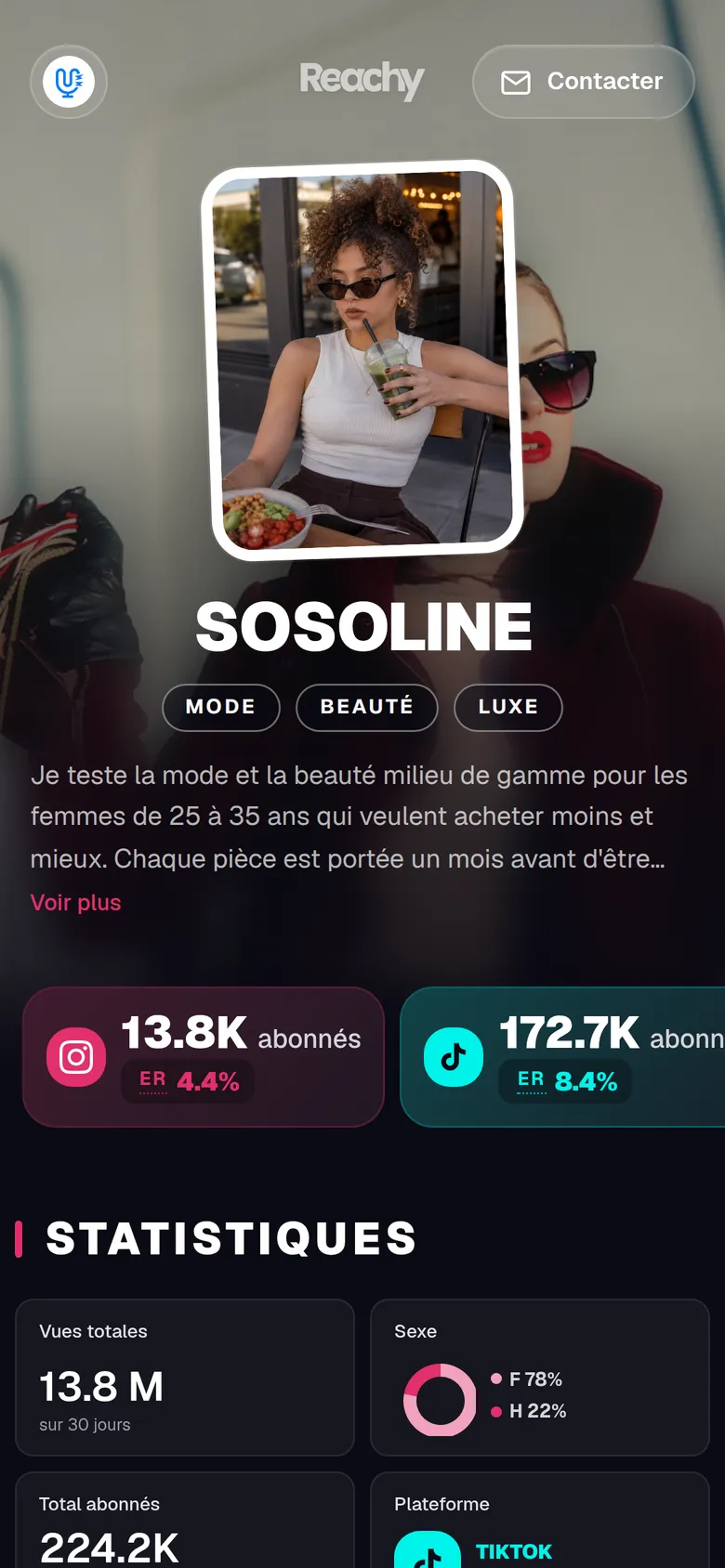
It connects to your accounts. You link Instagram, TikTok, YouTube, Facebook and Twitch through their official connection. Your numbers come from the platforms’ APIs, not manual entry: followers and engagement, plus your audience’s age, gender and countries on Instagram and YouTube, and countries and cities on Facebook (Meta no longer provides age or gender for Pages). Reachy doesn’t show TikTok demographics yet.
It creates your media kit in about 3 minutes. You pick one of the seven templates, and you get a public web page to share by link.
It keeps your numbers up to date. Your stats update automatically: when a brand opens your link, it doesn’t see numbers from six months ago.
You write the rest. Your bio, rates, formats and past brands are yours to fill in: those parts don’t come from the platforms.
A dashboard per platform. On top of the kit, you track your stats platform by platform.
Free during the beta. Reachy is in beta, and everything is free during this period.
The 7 mistakes that kill a media kit (and your credibility)
-
Unverifiable numbers. Blurry screenshots, unsourced stats, suspiciously round numbers. Go for numbers read directly from the platforms.
-
No rates. Without prices, the brand has to ask, and that’s one more round of messages. Give at least a range.
-
Amateur design. Word, Comic Sans and pixelated photos: your kit lands in the trash before anyone reads it.
-
Outdated data. Numbers that are months old raise concerns: either your audience dropped and you’re hiding it, or you don’t track your performance.
-
No clear niche. “Lifestyle” helps no brand. Be specific about your positioning (lifestyle for parents of kids aged 0 to 3 in Paris, for example).
-
Missing contact details. It happens more often than you’d think. A professional email and WhatsApp Business should appear at the top and bottom of the document.
-
A format that’s hard to share. A PDF too heavy to open, a Google Drive link with restricted access, a .pages file unreadable on a PC. Go for a public web link, and a lightweight PDF if someone asks for one.
Real media kit examples
Media kits that work quickly answer the brand’s unspoken question: “Why you, and not another creator?” A few example angles:
-
Personal finance niche. Highlights an audience with strong purchasing power (high-income professionals aged 25 to 45), a good click-through rate on affiliate links, and a talent for explaining complex topics.
-
Clean beauty niche. Highlights a female community aged 18 to 34, results from product campaigns (with before/after photos), and a consistent feed over several years.
-
Twitch gaming niche. Highlights average watch time, the share of subscribed viewers, and chat activity during brand placements.
Whatever your angle, your media kit should tell a story with numbers, not list an inventory. For complete kits, see 8 influencer media kit examples, one per niche.
FAQ: beginner questions about creating a media kit
How many followers do you need before creating a media kit?
There is no official threshold. Once you have an engaged audience and a clear niche, a few thousand followers is enough to approach brands. The smart move: create your media kit before the first brand reaches out, not after.
Can you create a media kit for free?
Yes. Canva offers free templates, Notion lets you build a custom format, and Reachy is free during its beta. The real cost is time: a handmade kit takes several hours and goes out of date fast.
How long does it take to create a media kit?
By hand (Canva or Word), plan on several hours for the first version, depending on how comfortable you are with the tool. With Reachy, creating it takes about 3 minutes once your accounts are connected. You still write your bio, rates and formats yourself.
Should you include your rates in your media kit?
Yes, in most cases. Without rates, the brand has to ask you for them, which adds a round of messages. Give ranges to keep room to negotiate.
What is the difference between a media kit and a press kit?
A press kit is for journalists and the media. An influencer media kit is for brands and marketing managers: it focuses on performance numbers and collaboration formats.
Do you need a different media kit for each platform?
Not necessarily. A multi-platform kit that shows your whole online presence is often more useful to brands. If you are pitching a brand for TikTok only, prepare a simpler version focused on that platform.
Should my media kit be in French or in English?
If you are targeting the French market, in French. If you are pitching internationally, have an English version ready.
How do you update your media kit without starting over?
With a handmade file, you have to reopen the source document every time your numbers change. With Reachy, your stats update automatically: your link stays current without you having to redo it.
Conclusion: your media kit, your first salesperson
Your media kit works for you even when you’re not around. It presents your audience, sets your rates and shortens the time between first contact and signature. Creating it takes a few minutes, and if it updates itself, you don’t have to come back to it every time your numbers change.
Read next: Fake Instagram followers: the detection guide for brands, The best tools for content creators in 2026, The most profitable niches for content creators in 2026. And to generate your media kit from your real stats: Reachy.